

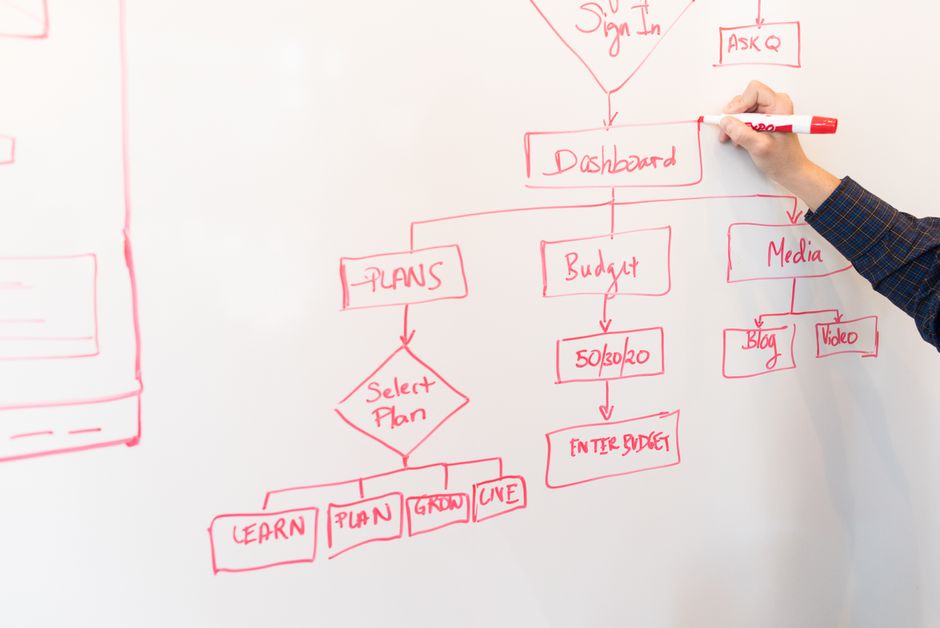
Business process automation replaces repetitive, error-prone work with software that routes information, applies business rules, and tracks tasks from start to finish. At Keene Systems, we build custom applications around the way a business actually handles orders, approvals, production data, and service requests.
For a small or midsize company, the pressure often comes from spreadsheets that no longer agree, an old desktop application that cannot support remote teams, or a workflow known by only one employee. The right solution connects the steps and data without forcing staff into a process that does not fit.
Key takeaways
Effective automation improves a defined workflow by making its data, rules, ownership, and status visible in software.
Choose the smallest useful change
Where automation options fit in a real operation

Automate the work, not just the screen
A custom application is useful when a process crosses people, departments, or systems and its handoffs are difficult to see. For example, a manufacturer might receive a job request in a spreadsheet, verify materials in a separate database, and send status updates through email. A tailored web application can give authorized staff one place to enter job details, check required fields, route approvals, and see current status.
The application should reflect the actual sequence of work. A process map identifies who starts a task, what information is required, which conditions change its route, and what counts as completion. That map is a more valuable starting point than a list of screens or a request to automate every existing step.
According to the U.S. Government Accountability Office, Port Infrastructure: U.S. Ports Have Adopted Some Automation Technologies and Report Varied Effects, all 10 of the largest U.S. container ports have adopted automation technology to varying degrees. The example illustrates that automation can take different forms and levels of scope, rather than requiring every operation to adopt the same system.
Compare the technical approaches
- Custom web application: Fits a workflow that needs shared access, role-based screens, approvals, and centralized records. ASP.NET with SQL Server is one option for a business system built around structured operational data.
- Integration with existing software: Fits a process where the current applications remain useful but staff retype information between them. Integration needs clear ownership for each field and a plan for errors or unavailable systems.
- Modernization of a desktop tool: Fits a business that depends on a legacy Access, FoxPro, or other desktop application but needs browser-based access or a maintainable platform. The existing rules and data need to be understood before conversion.
- Mobile application: Fits inspections, field service, delivery, or shop-floor tasks where staff need to capture information away from a desk. Forms should be designed for the real device, network conditions, and pace of work.
For more examples of how workflow changes translate into software, see our guide to business process automation examples that improved productivity. The appropriate option follows from the constraint in the process, not from a preference for a particular technology.
How to choose the right workflow to automate

Use decision criteria grounded in the process
Begin with a process that occurs often enough to matter and has a visible source of friction. A useful candidate might involve repeated data entry, uncertain approval status, delayed handoffs, or errors caused by copying values between spreadsheets. A rare task with many judgment-based exceptions is usually a weaker first candidate.
Federal law provides a useful principle for system design. According to 10 U.S. Code § 2222, Defense business systems, the Secretary of Defense shall ensure that defense business processes are reviewed, and as appropriate revised, through business process reengineering to match best commercial practices, to the maximum extent practicable, so as to minimize customization of commercial business systems. For a commercial business, the practical lesson is to examine the process before encoding it, rather than automatically reproducing each inherited step.
Assess the workflow against these criteria:
- Frequency and volume: Count how often the task occurs and how many records or handoffs it creates. High-volume rekeying is easier to measure than an occasional, highly variable request.
- Rule clarity: Write down required fields, approval limits, exception paths, and who can override a rule. If staff give different answers, resolve the policy before development.
- Data condition: Identify the source of truth, duplicate records, missing fields, and spreadsheet versions. SQL Server database design matters when several screens or reports rely on the same operational data.
- System boundaries: List the applications that send or receive information. Decide which system owns each record and what should happen if an integration fails.
- User context: Specify whether employees work at desks, on mobile devices, or in production environments. That affects interface design, permissions, and network requirements.
Pro Tip: Pick one measurable pain point, such as time spent reconciling order status, and record a baseline before development. That gives the team a concrete test for whether the released workflow is helping.
Also consider whether the business is prepared to maintain the software. A custom application requires an owner for process decisions, user access, data quality, and change requests. If no one can make those decisions, a new tool is unlikely to resolve the underlying uncertainty.
What happens after you decide to automate
A practical custom development sequence
- Map the current workflow: We start by clarifying the trigger, users, information captured, approvals, exceptions, and final outcome. Existing forms, spreadsheets, reports, and sample records help expose differences between the documented process and the work employees actually do.
- Define the target workflow: The team decides which steps remain, which should change, and what the application must enforce. This is where business rules become specific requirements, such as required fields, approval conditions, and status transitions.
- Design data and software architecture: The database structure, application components, permissions, and integration boundaries are planned together. A clear software development process helps connect the initial requirements to implementation and testing.
- Build and review working software: Developers implement the application in manageable pieces and review the screens and behavior against the requirements. Users should validate realistic examples, including incomplete submissions and exceptions, not only the ideal path.
- Test the workflow and data: Testing checks calculations, permissions, record relationships, error handling, and integration behavior. For a production workflow, verify that a user cannot approve a task outside their role and that a failed data transfer is visible rather than silently lost.
- Prepare rollout and support: Plan user access, data migration, training, and the point at which staff stop using the old method. After release, maintenance addresses defects and changes in the business process or supporting technology.
Pro Tip: Include at least one realistic exception in acceptance testing, such as a missing part, rejected approval, or duplicate submission. These cases reveal whether the software supports actual operations instead of only the clean demonstration path.
A phased release can reduce disruption when teams need to validate the new workflow before replacing a desktop tool or spreadsheet entirely. The appropriate rollout depends on the risk of interruption, the quality of the source data, and how many connected systems must change together.
Our perspective on business process automation
Make the process explicit before writing code
We approach business process automation as a combination of process analysis, software architecture, and implementation. The application has to represent real business rules clearly, protect the integrity of its data, and provide useful screens for the people completing the work. A fast interface built on unclear rules simply moves confusion into a new system.
We also avoid treating every manual action as waste. Some work involves judgment, approval, or a relationship with a customer or supplier. Automating the routing and recordkeeping around that work can improve visibility while leaving the decision with the appropriate person.
Automation should not become a pretext for intrusive employee monitoring. In 2022, former National Labor Relations Board General Counsel Jennifer Abruzzo called for more robust enforcement of existing labor law to protect workers from intrusive surveillance practices, citing concern over how such practices could interfere with workers’ Section 7 rights, according to Harvard Law School’s Regulating AI in the Workplace. We focus software requirements on task status, data quality, and operational accountability, not unnecessary tracking of individual behavior.
When to bring in a software specialist
Know when the workflow needs technical design
Bring in a specialist when the process depends on several data sources, role-based approvals, legacy application behavior, or database changes that could affect daily operations. A programmer departure is another clear signal if the business has a system it cannot safely modify or support. The same is true when a spreadsheet has become the unofficial system of record for orders, production, or customer requests.
Prepare a short process brief for the first discussion: current steps, user roles, sample forms, representative spreadsheet rows, known exceptions, systems involved, and the result the business needs to measure. Do not send sensitive production data until access and handling arrangements are clear.
A capable custom software provider should explain the proposed workflow, data model, integration risks, testing approach, rollout plan, and ongoing maintenance responsibilities in plain terms. If the recommendation begins with a technology choice but cannot explain which process problem it addresses, the scope is not ready. Brookings defines “passive computing infrastructure” as any intermediary technology that does not influence or determine the outcome of a decision, including web hosting; domain registration; networking; caching; or cybersecurity, according to A comprehensive and distributed approach to AI regulation.
That distinction is useful when separating infrastructure from software that actually applies workflow rules.
Frequently asked questions
What is business process automation?
Business process automation uses software to coordinate defined tasks, data, and rules that otherwise rely on manual handoffs. A custom application might collect a request, validate required information, route it for approval, update a shared record, and show the current status. Automation does not mean every decision is made without people. In many business workflows, software handles repeatable routing and recordkeeping while staff retain responsibility for exceptions and judgment.
Which business process should a company automate first?
Start with a recurring process where the current friction is visible and measurable, such as repeated entry into multiple systems, delayed approvals, or time spent reconciling competing spreadsheets. Confirm that users agree on the workflow and that the business can identify the correct source of each data field. Avoid beginning with a process whose rules change by person or whose exceptions have not been documented.
Clear scope makes it easier to test whether the application is solving the intended problem.
Does automation require replacing existing software?
No. If an existing application still supports its core purpose, integration may remove duplicate entry or provide a clearer workflow around it. Replacement makes more sense when the software is inaccessible, difficult to maintain, tied to a single workstation, or unable to support required users and processes. The decision depends on the system’s data quality, integration options, business rules, and ongoing support needs.
A technical assessment should compare those constraints before choosing a rebuild or connection strategy.
How do you know whether automation improved productivity?
Choose measures tied to the original bottleneck. Depending on the workflow, compare time to complete a request, number of incomplete records, approval delays, duplicate entry, rework, or the effort required to produce a status report. Set the baseline before release and use the same definitions afterward.
Also gather feedback on usability and exceptions, because a shorter average completion time is not useful if the application makes difficult cases harder to handle.
How Keene Systems supports business process automation
Custom applications for the work you need to improve
Keene Systems is a veteran-owned software development company founded in 1987, with a team of 50+ web and mobile developers. We work with businesses that need tailored applications, including companies modernizing desktop systems, replacing spreadsheet-based workflows, or building shared operational tools. Our work spans project exploration, development, and ongoing maintenance, with technology selected to fit the application’s requirements.
Relevant capabilities include:
- Web application development: Build browser-based workflows for staff who need shared access to operational records.
- SQL Server database design: Structure business data so applications can validate and retrieve records consistently.
- Legacy system modernization and conversions: Replace or extend older desktop applications, including Access and FoxPro systems.
- Mobile application development and integrations: Support field or operational data capture and connect applications where the workflow requires it.
For process questions that are ready to become a software scope, contact our team about custom software development.
Conclusion
Start with one workflow and a clear measure
Business process automation is most useful when it addresses a specific source of friction: inconsistent records, repeated entry, unclear ownership, or delayed handoffs. The first step is to document one workflow from its trigger to its completed outcome, including the exceptions that staff handle today. Then identify the data involved, the systems it touches, and a measure that would show practical improvement.
For business process automation, Keene Systems can help translate that defined workflow into custom software, from application and database design through rollout and maintenance. A precise problem statement gives development a sound starting point and helps the business judge the result against operational needs.
Sources
- Port Infrastructure: U.S. Ports Have Adopted Some Automation Technologies and Report Varied Effects
- 10 U.S. Code § 2222 – Defense business systems: business process reengineering; enterprise architecture; management
- Regulating AI in the Workplace
- A comprehensive and distributed approach to AI regulation