


A manufacturing custom solutions case study shows how purpose-built software connects production data, work orders, inventory, and management decisions without forcing a plant into a generic workflow. For small and midsize manufacturers, the practical challenge is often not a lack of information, but information split between spreadsheets, older desktop applications, and systems that do not share updates.
This article explains a disciplined approach to that transformation. No particular client, project baseline, or measured outcome was supplied for this article, so it does not attribute invented results to a manufacturer. Instead, it lays out the decisions, technical work, and operational signals a real project should make visible.
Key takeaways
Manufacturing software works best when it reflects real production workflows, connects reliable data, and gives people a clear path to validate changes before rollout.
Manufacturing software decisions at a glance
Prepare the production picture before selecting software
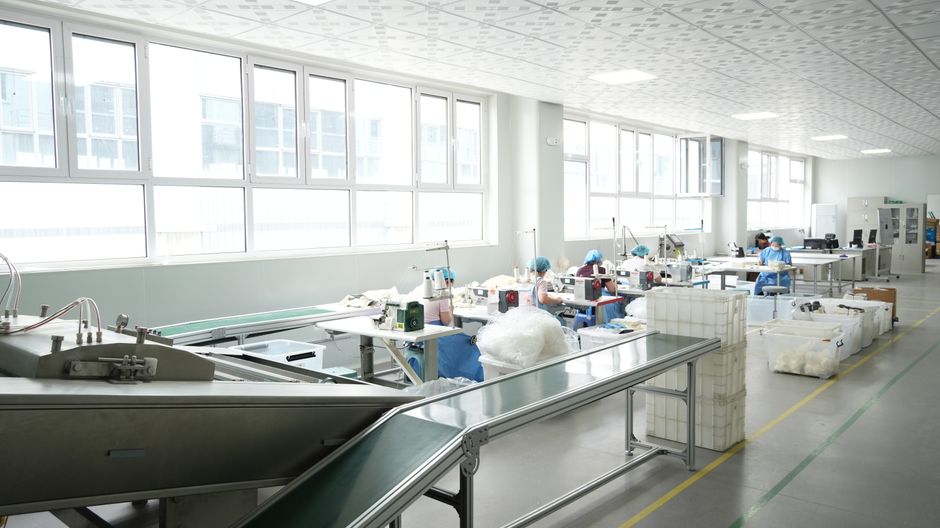
Document the workflow people actually follow
Start with one bounded process, such as releasing a work order, recording a production step, or flagging a material shortage. Follow it from the first trigger through the final record. Include exceptions: a partial completion, a rejected part, a substitute material, or an order paused while a machine is unavailable. Those exceptions often reveal why a spreadsheet or desktop tool became essential.
Interview the people who create, update, approve, and rely on the data. Compare their descriptions with the forms, reports, and files they use during a shift. A procedure document can describe the intended process while a production lead’s spreadsheet tracks the information the official system leaves out.
Inventory data sources and ownership
List each application, database, shared workbook, and manual record involved. For every important field, identify where it originates, who can change it, and which downstream screens or reports consume it. A work order number, part identifier, routing step, and inventory quantity need consistent definitions before integration work can be trusted.
This is also the time to inspect SQL Server tables, FileMaker layouts, Access databases, and desktop application exports if they are part of the current workflow. Record formats, duplicate identifiers, blank values, and undocumented business rules. These details shape data migration and testing more than a clean-looking screen design does.
- Production flow: Record the events that move work forward and the roles responsible for each transition.
- System boundaries: Note which application owns orders, inventory, quality records, and customer-facing information.
- Operational constraints: Capture shared terminals, shift changes, shop-floor connectivity, and the devices employees actually use.
- Evidence of failure: Save examples of duplicate entry, delayed updates, conflicting spreadsheet versions, and reports that require manual correction.
Useful discovery produces a process map, a field and system inventory, and an agreed list of priorities. Keene Systems’ guidance on business process automation is relevant when the goal is to remove repeated handoffs rather than simply digitize an existing form.
A step-by-step playbook for a manufacturing application

Move from a bounded workflow to a tested release
- Choose a measurable workflow: Select a process with clear users and a visible operational outcome, such as fewer manual status reconciliations or more timely work-order updates. Define how the current process will be observed so the team has a baseline to compare with the new workflow.
- Map roles, states, and exceptions: Define who can create, assign, update, approve, or reopen a record. Specify valid state changes, including holds, partial completions, rejected items, and corrections, so the application reflects production reality rather than an idealized path.
- Set the application boundaries: Decide whether the project should extend a supported system, replace a legacy tool, or create a focused web application that integrates with existing systems. Identify the system of record for each data type and document what the application must not change.
- Design the data and integration: Define identifiers, relationships, validation rules, and audit information before building screens. For SQL Server or other database work, review existing schema and query patterns; for integrations, specify the message format, update timing, retry behavior, and error ownership.
- Build and review a working slice: Implement one end-to-end path, such as releasing a work order and recording its first production update. Have actual users review the labels, required fields, navigation, and exception handling before the team expands the feature set.
- Test against realistic records: Use representative orders, parts, and routing steps, including incomplete and inconsistent records. Test permissions, concurrent edits, reporting totals, and recovery from a failed integration, then correct data issues before they reach production users.
- Roll out with a controlled handoff: Train users against their actual tasks, publish a clear support route, and retain a defined way to identify and correct data-entry errors. Monitor the agreed operational measures after release and prioritize fixes based on observed workflow friction.
Pro Tip: Keep a small set of representative work orders and exception cases for repeatable acceptance testing. Reusing those records after a change helps catch regressions in statuses, validations, and production reports.
A disciplined quality process matters because a manufacturing application can appear correct while a report or downstream system is reading the wrong field. Keene Systems explains its approach to quality in custom software development projects, including the importance of validating work throughout development.
Ready to map a manufacturing workflow for a custom application? Discuss your software project with our team.
Signs of progress, and when to bring in specialists
Look for changes in the work, not just the interface
Early evidence of useful manufacturing software is operational: employees enter a production update once, supervisors can see the same current status, and a planner can identify a blocked order without assembling information from several files. These are signals to measure, not outcomes to assume. Compare the new process with an agreed baseline and verify that the definition of each measure has stayed consistent.
Track data completeness, time between a production event and its recorded status, the number of manual corrections, and exceptions that require someone to leave the application. If a new screen reduces duplicate entry but increases correction requests, the workflow or validation rules need review. A successful release is not simply one that users can log into.
Independent manufacturing examples also show the value of treating improvement as a defined operational effort. According to Custom Container Solutions, LLC Surpasses Production Objectives with IMC Support, Custom Container Solutions (CCS) is a quality manufacturer of custom and industry standard roll-off, hook lift, and front and rear load steel containers. That description underscores why software requirements need to reflect the manufacturer’s actual products and processes.
- Progress signal: The same order status appears consistently in the application and the reports that depend on it.
- Warning sign: Employees maintain a parallel spreadsheet because the application omits a required exception or status.
- Progress signal: Managers can trace a reported quantity to its source record and update history.
- Warning sign: A routine application change breaks a report, integration, or another department’s workflow.
Pro Tip: Review a sample of changed records with a production user and a report user together. They can confirm whether the field means the same thing at the point of entry and in management reporting.
Bring in software specialists when the application has undocumented rules, the original developer is unavailable, or a proposed change affects database structure and several integrations. Keene Systems’ software architecture guidance can help readers understand why maintainability and clear system boundaries matter alongside immediate feature needs.
Our perspective
We approach manufacturing software as an operational system, not a set of screens. A useful design starts with the event that changes the work: an order released, a quantity completed, a quality hold recorded, or material issued. From there, we define the data, permissions, and reporting that make that event useful to the next person in the workflow.
We advise against replacing every system at once when a focused application or integration can address the clearest bottleneck. We also avoid treating a spreadsheet as merely a bad interface. It may contain formulas, exception logic, or context that has not been captured anywhere else. That logic needs to be understood and deliberately accepted, revised, or retired.
A custom application should fit the plant’s real constraints, including shared devices, role differences, existing databases, and the pace of production. Our experience since 1987 and team of 50+ skilled web and mobile developers support work across technologies such as ASP.NET, SQL Server, FileMaker, React, Java, and PHP/MySQL. The right stack is the one that fits the required workflow, integrations, and maintenance plan, not simply the newest option.
Manufacturing projects also benefit from staged decisions. We define a narrow first release, validate it with users, and then use what the team learns to refine later work. That approach gives employees a chance to test the system against real production tasks before a broader rollout.
When a manufacturing software specialist is needed
Bring concrete evidence to the first discussion
A specialist is particularly useful when a plant depends on an aging desktop application, has lost the programmer who maintained it, or cannot reconcile production information across spreadsheets and databases. The same applies when a growing operation needs a web or mobile application that existing tools cannot support, or when an integration must preserve established ERP and inventory workflows.
Bring a sample process map, screenshots or blank forms, representative reports, a list of current applications, and examples of exceptions. Do not send sensitive production or customer records unless handling and access have been agreed. Identify who owns each system and who can approve changes to production rules.
A capable development partner should explain how it will discover requirements, inspect existing data, test integrations, manage access, and validate releases with users. It should also identify assumptions and risks in plain language, including which requirements need a decision before development proceeds. Keene Systems serves organizations across the United States, with custom software development, web application development, database design, and modernization capabilities relevant to these projects.
FAQ
What does custom manufacturing software usually handle?
It can support defined workflows such as work-order tracking, production status, inventory visibility, quality records, scheduling, and operational reporting. The appropriate scope depends on where information is created and which existing systems must remain authoritative. Before development, map the process and assign ownership for each key data field. That prevents a new application from becoming another disconnected place to enter the same information.
Should a manufacturer replace its ERP system to improve production visibility?
Not automatically. A manufacturer may need a focused web application or integration that presents specific production information while the ERP continues to own orders or inventory. Start by identifying the missing workflow and the source of truth for each field. Replacing a core system without understanding its dependencies can expand the project and disrupt processes that already work.
How do you modernize an old desktop manufacturing application?
First document the screens, calculations, exports, user roles, and exceptions that employees rely on. Inspect the underlying database and identify where data is duplicated or manually corrected. Then decide whether the application should be converted to a web application, rebuilt around a more maintainable architecture, or replaced by a focused workflow. Test migrated records and reports against known examples before relying on the new system.
What should be included in a manufacturing software pilot?
A useful pilot covers one complete workflow, representative users, realistic records, and the exceptions that routinely interrupt work. Include permissions, reporting, integration behavior, and a way to record errors or user feedback. Agree on observable measures before rollout, such as record completeness or the time between an operational event and its entry. A pilot should validate both the software and the process around it.
How can custom software reduce spreadsheet dependence?
Start by identifying what a spreadsheet does: calculations, status tracking, approvals, exception notes, or reporting. Define the rules and data ownership before recreating the workflow in an application. A web application can provide shared records, controlled access, and validation, but only if it handles the decisions people currently make in the spreadsheet. Test the new process with its users before retiring their familiar working file.
How Keene Systems helps manufacturers modernize
Match the solution to the process
Keene Systems builds tailored software for business needs, including manufacturing workflows that span web applications, databases, and existing tools. Our work can begin with project exploration and continue through implementation and ongoing maintenance. The appropriate technical approach follows the requirements: ASP.NET and SQL Server for web applications and data, or other relevant technologies such as FileMaker, React, Java, and PHP/MySQL.
Relevant capabilities include:
- Web application development: Build shared operational workflows for authorized users across roles and locations.
- SQL Server database design: Structure and validate application data so records support dependable workflows and reporting.
- Legacy system modernization: Replace or extend desktop applications when their limits obstruct access, support, or integration.
- Business process automation: Reduce repeated manual handoffs by translating defined rules into application workflows.
- Application integration: Connect systems with clear ownership of data and explicit handling for errors and updates.
Our team takes a disciplined approach to requirements, architecture, testing, and maintenance. If a manufacturing workflow needs a clearer path from production entry to management reporting, talk with our custom software development team.
Conclusion
Start with one production workflow
The most useful next step in a manufacturing custom solutions case study is to define one workflow that creates recurring friction, then document its users, data, exceptions, and systems of record. That creates a practical basis for deciding whether to extend an existing application, integrate systems, modernize a desktop tool, or build a focused web application.
Do not begin by choosing a framework or promising a plant-wide transformation. Begin with a traceable process and representative records, then test a complete slice with the people who use and report on it. That is how a manufacturer can make technical decisions grounded in production work, and determine what should be improved next.