

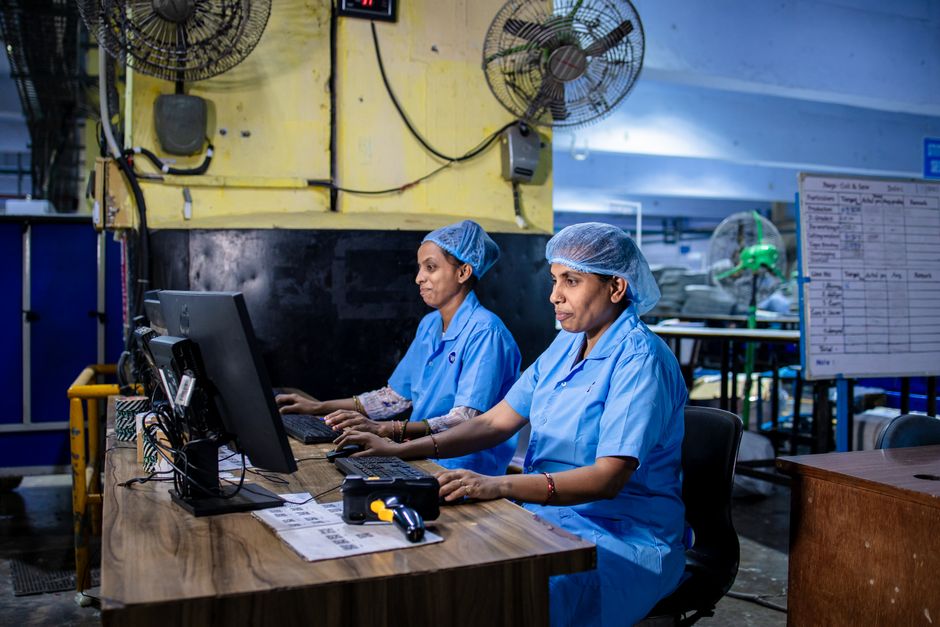
Manufacturing efficiency custom software development connects production data, people, and workflows in an application designed around how a plant actually operates. For small and midsize manufacturers, that can mean replacing spreadsheet-based tracking, aging desktop tools, or disconnected databases with a more reliable way to manage work. The right solution starts with a specific operational problem, not a predetermined technology.
It should fit existing processes, make information easier to act on, and support the next stage of production without forcing a disruptive overhaul.
Key takeaways
Custom software improves manufacturing operations when it addresses a defined workflow, respects the plant’s data realities, and is measured against useful operational indicators.
Choose a starting point by the problem
Before you start: define the production problem

Document the workflow as it runs today
Begin with one production process that creates recurring friction. Examples include recording a machine’s status on paper before someone enters it into a spreadsheet, tracking work orders in separate files, or asking a supervisor to reconcile production updates at the end of a shift. Describe the trigger, the people involved, the records created, and the decision that depends on those records.
Walk the process with the employees who perform it, not just the person who receives its reports. A planner may need a different view from a line lead, while a quality employee may need to trace a particular inspection to its work order. These differences affect permissions, screen design, and the data model.
According to Annual Report on U.S. Manufacturing Industry Statistics: 2022, the U.S. remains a major manufacturing nation; however, other countries are rising rapidly. That context makes responsive operations valuable, but it does not identify which software project belongs at the top of a particular plant’s list. The first decision should come from your own workflow evidence.
Gather real records and system constraints
Collect representative forms, spreadsheets, database exports, and screenshots of the applications employees use today. Note where a value originates, whether it is entered more than once, which fields are mandatory, and how corrections are handled. If an old desktop application contains specialized rules, capture those rules before changing the system.
List the systems the proposed application must work with, such as an existing SQL Server database, ERP, inventory tool, or FileMaker solution. For each connection, clarify whether the new application reads data, writes data, or both. Confirm who owns access to the system and what technical documentation exists.
Manufacturers do not all need a full manufacturing execution system. A focused web application for dispatching work, tracking exceptions, or coordinating approvals may address the actual gap. The scope should reflect the production problem, not a vendor’s feature list.
A practical playbook for manufacturing efficiency custom software development
Move from workflow evidence to a tested application
- Select a measurable bottleneck: Choose a workflow with visible symptoms, such as repeated data entry, unclear work-order status, or delayed access to inspection results. Record how the process works now so the team has a baseline for later comparison.
- Map users, events, and records: Identify each role, the action that changes a record, and the information needed for the next decision. For a production-tracking application, define how a job moves from scheduled to active, held, completed, or reviewed, and which roles can make each change.
- Design the data model and boundaries: Decide which application owns each important value and how records connect. A SQL Server database might hold work orders and status history, while an existing system remains authoritative for inventory; that boundary must be clear before integration work begins.
- Prototype the critical screens: Show operators and supervisors the forms, queues, and status views they will use. Test the details that often create friction on the shop floor, including large touch targets, short data-entry paths, clear validation messages, and how an exception is flagged.
- Build a narrow first release: Implement the core workflow and its essential reporting before adding secondary features. This gives users a working slice to validate and reduces the chance of automating an assumption that does not match production practice.
- Test realistic cases and permissions: Use examples with missing fields, duplicate submissions, changed schedules, and interrupted connections. Confirm that the application preserves a useful history and that an operator cannot accidentally edit information reserved for another role.
- Roll out with a feedback loop: Train the initial user group, define how issues are reported, and review actual usage before expanding. Keep a documented backlog so requests for new screens or integrations are assessed against the production goal.
Pro Tip: For a status-tracking application, retain a timestamped history of status changes instead of overwriting the previous value. That record helps a supervisor understand when a job changed state and gives the development team a concrete way to investigate unexpected workflow behavior.
According to Advances in Adaptive Scheduling in Industry 4.0, the shift of traditional mass-producing industries towards mass customisation practices is nowadays evident. Scheduling software therefore needs clear rules for handling the mix of repeatable work and changing job requirements. The right rules depend on the plant’s production model, available data, and how planners currently respond to changes.
Signs it is working, and when to get a professional involved
Measure behavior that the application can affect
Look for changes in the workflow, not just whether employees can log in. Useful measures include how often a value is entered again in another system, how long it takes a supervisor to identify the current status of a job, how many records are missing required fields, and how frequently production updates arrive after the decision they support.
Choose measures that connect to the application’s intended job. If the goal is to coordinate work orders, compare status visibility and the handling of exceptions. If the goal is spreadsheet elimination, review whether teams now maintain one agreed record and whether corrections retain a clear history. Avoid claiming a production improvement that the application did not measure.
According to Efficiency Improvements in U.S. Manufacturing: Return on Investment for Small and Medium Establishments, the net present value is disproportionally distributed among investments, where 20% of the investment categories represent 82% of the net present value. For a software initiative, this supports careful prioritization: validate the operational problem and expected benefit of each proposed feature instead of treating every requested enhancement as equally important.
Know when the system needs a deeper review
Bring in a custom software specialist when production relies on undocumented rules, a critical application is tied to a single employee, multiple systems disagree about the same data, or a desktop tool no longer supports the way staff need to work. These are not merely interface problems. They can involve database structure, integration boundaries, security roles, and migration of historical records.
A focused review is also useful when a project has stalled or the original developer is no longer available. The first task is to inspect the code, database schema, deployment process, and outstanding defects before committing to a replacement or rewrite. A measured assessment can distinguish a repairable application from one that needs a new architecture.
Pro Tip: Before expanding a pilot, compare a sample of new application records with their source documents and existing system records. Check identifiers, timestamps, and correction history, not just the screen display. A clean-looking interface does not prove that the underlying data is consistent.
Research titled Does the adoption of emerging technologies improve technical efficiency? Evidence from Korean manufacturing SMEs reports that, after observed and unobserved factors are controlled, the technical efficiency of adopters is higher by more than 26% on average, compared to non-adopters. That finding concerns the study’s Korean manufacturing SMEs, not a promised result for a U.S. software project. It reinforces the need to evaluate technology in the context of the business and its implementation.
Our perspective
Fit the software to the work, not the other way around
We approach manufacturing applications by first understanding the process the software must support. A production dashboard is only useful if its data is current and employees understand how to update it. A custom application should make those responsibilities explicit, represent the actual handoffs, and give each role the information needed to act.
We would avoid beginning with a long feature wish list or assuming that a plant needs a large, all-at-once replacement. A manufacturer might get a better first release by focusing on work-order visibility or replacing a fragile spreadsheet workflow, then deciding what should connect next. The right sequence depends on the systems already in place, the quality of the data, and the consequences of changing a production process.
Our team has worked with web application development using ASP.NET and SQL Server, as well as FileMaker, React, Java, and PHP/MySQL. The appropriate stack follows the requirements, existing environment, and long-term support plan. Our software architecture guidance explains why architecture decisions matter to the application’s ability to support business operations.
When to bring in a professional
Prepare the evidence for a useful first discussion
A specialist is particularly helpful when an older desktop application must become accessible as a web application, spreadsheets have become the unofficial production system, or an integration must connect manufacturing data without creating conflicting records. The same applies when a company has lost its programmer and needs to understand what the existing application does before changing it.
Bring a simple workflow sketch, sample forms or spreadsheets, a list of current applications, and examples of the decisions employees make using the data. Note which information is sensitive, who needs access, and what must remain available during a transition. If you have the source code, database documentation, or a record of known defects, include those materials.
A qualified provider should be able to explain how it will inspect the current system, clarify requirements, identify integration ownership, test the proposed workflow, and support the application after release. It should also describe what remains uncertain and what evidence would resolve that uncertainty. Keene Systems’ custom software development process outlines the value of moving from project exploration through development and ongoing maintenance.
FAQ
What is custom software development for manufacturing?
Custom software development for manufacturing is the design and construction of an application around a manufacturer’s specific workflows, data, and user roles. It can support tasks such as work-order tracking, production updates, quality records, or coordination between existing systems. Unlike a general-purpose product, its requirements are defined by the operation it must serve, including the plant’s rules for approvals, exceptions, and record ownership.
Which manufacturing processes are good candidates for a custom application?
A process is a strong candidate when employees repeatedly reconcile different records, re-enter the same information, or rely on one person to interpret a spreadsheet. Work-order status tracking, production reporting, and structured approval workflows are common examples. Start with a process that has clear users and decisions, then determine whether an application can address the friction without creating unnecessary changes to the production floor.
Should a manufacturer replace spreadsheets with custom software?
A spreadsheet is not automatically a problem. It becomes a concern when several teams maintain separate versions, formulas are difficult to verify, or an important workflow depends on manual updates with no clear history. A custom web application can provide controlled entry, defined permissions, and shared records. Before replacement, document which calculations, reports, and exceptions employees genuinely rely on.
How does custom software work with an existing ERP or database?
Integration starts by deciding which system is authoritative for each data field. The custom application might read order data from an ERP, record a production update in its own database, or pass a completed status back to another system. The design must address identifiers, validation, failed updates, and duplicate messages. Those rules should be documented and tested with realistic records before rollout.
Can an old manufacturing desktop application be converted to a web application?
Often, but a conversion should begin with an assessment of the existing application’s workflows, code, database, and dependencies. The visible screens may not reveal hidden business rules or special cases that employees have relied on for years. A specialist can determine which behavior should be preserved, which should be redesigned, and how historical data and user permissions should be handled during the transition.
How should a manufacturer measure whether new software helps?
Set a baseline tied to the workflow before the application is introduced. Depending on the goal, measure duplicate entry, missing fields, time to locate a current work-order status, or delays in recording production events. Review the same measures after users adopt the new process, and separate software effects from changes in staffing, scheduling, or production mix. The evidence should guide the next development decision.
How Keene Systems helps manufacturers
Match the technical work to the operational need
Keene Systems is a veteran-owned custom software development company founded in 1987, with a team of 50+ web and mobile developers. We work with businesses across the United States, helping define the application and technical approach around each organization’s processes rather than prescribing one manufacturing platform for every plant.
For a manufacturer, relevant work may include:
- Web application development: Build browser-based tools for production tracking, approvals, or shared work management.
- SQL Server database design: Structure application data so work orders, status changes, and related records connect clearly.
- Legacy system modernization: Assess and update older applications, including desktop-to-web conversions.
- Application integration: Define how a custom application exchanges data with existing systems.
- FileMaker Pro development: Extend or modernize workflows that already depend on FileMaker.
Our manufacturing business case study offers a relevant example of a manufacturing-focused software transformation. The useful takeaway is to examine the operational challenge and solution approach, then judge how closely those conditions match your own environment.
Ready to clarify the right first step for your production workflow? Talk with our custom software development team.
Conclusion
Begin with one production workflow you can verify
Manufacturing efficiency custom software development works best when the application responds to a specific, documented problem. Start by tracing one workflow from its first data entry to the decision it supports. Identify where records are duplicated, delayed, or difficult to trust, then define a measure that will show whether a proposed application improves that process.
That evidence gives your team a practical basis for choosing between a focused web application, a spreadsheet replacement, a legacy conversion, or an integration. It also helps a software partner understand the real rules before designing screens or databases. A clear first workflow is the most important next step toward custom software that supports manufacturing operations.
Related reading
- Case Study: Transforming a Business with Keene Systems’ Custom Software Development
- Understanding the Role of ASP.NET in Custom Software Development at Keene Systems
Sources
- Advances in Adaptive Scheduling in Industry 4.0
- Annual Report on U.S. Manufacturing Industry Statistics: 2022
- Efficiency Improvements in U.S. Manufacturing: Return on Investment for Small and Medium Establishments
- Does the adoption of emerging technologies improve technical efficiency? Evidence from Korean manufacturing SMEs